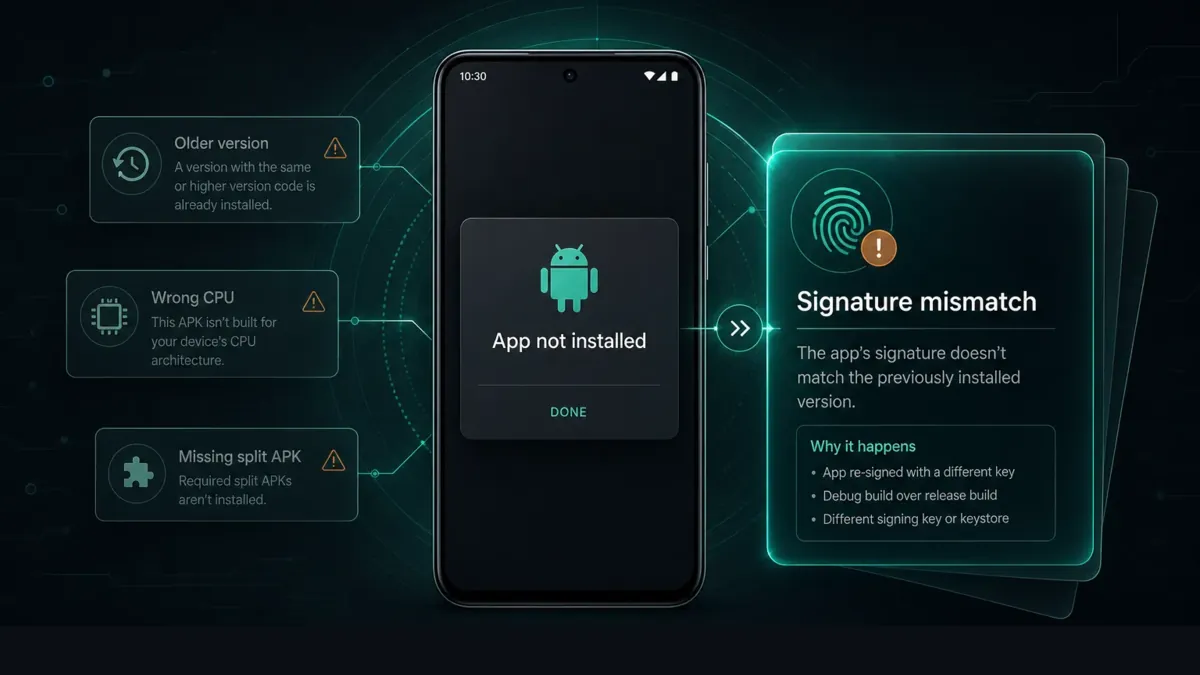
Are you getting the “App Not Installed” error while trying to install an APK file? This is one of the most common issues faced by Android users, especially when installing mod APKs or updating outside Google Play.
Updated July 13, 2026: this guide now covers signature conflict, downgrade blocks, ABI / SDK mismatch, split / XAPK / APKS cases, and Android 15/16 per-app install permissions that older “just uninstall and try again” advice misses.
Whether you are on Android 13, 14, 15, or 16, the same rule applies: matching signatures, intact files, compatible APIs and CPU splits, enough free space, and permission for the exact app that opens the file. If Android cannot even read the package, use our companion APK Parsing Error guide first.
Why Android shows “App Not Installed”
The message looks like one error. It is not. Common causes include:
- Signature conflict — same package name, different signing certificate
- Downgrade blocked — the APK’s version code is older than the installed app
- ABI / SDK mismatch — wrong CPU split or
minSdkVersiontoo high - Split / XAPK / APKS — missing required split pieces
- Corrupted download, low storage, or blocked unknown-source permission
- Play Protect or OEM security interrupting the final install step
If you sideload often, compare package name, version, and signature before retrying random mirrors. A sideload-focused browser like Apkaura can surface those details before you tap Install again.
Still stuck? Try these
Useful after OEM updates, aggressive Play Protect, or a stuck Package Installer.
- Restart your device
- Use a different file manager to open the APK
- Temporarily review Play Protect settings (Settings → Security → Google Play Protect), then turn protections back on
- Clear cache for Package Installer / Files, then retry
- Inspect the next APK’s package, version, and signature with Apkaura before guessing another mirror
FAQ
Why does APK say app not installed?
Usually signature conflict, downgrade block, wrong ABI/SDK, missing split packages, corrupted download, low storage, or blocked unknown-source permission.
Can I install mod APK without uninstalling the original app?
In most cases, no—different signatures conflict. Uninstall first, or use a clone with a different package name.
Can I install an older APK over a newer version?
Usually no. Android blocks downgrades. Remove the newer install first or get a same-or-higher version.
What if the APK is arm64-only?
Download a universal build or the ABI split that matches your device. Retrying the same arm64-only file will keep failing on incompatible CPUs.
How is App Not Installed different from APK Parsing Error?
Parsing Error means Android cannot read the package. App Not Installed means install started but was blocked—often signature, downgrade, ABI, or split issues. See our parsing guide when the file never opens.
Is APK installation safe?
Safer when files come from trusted listings and you check package name, permissions, and signature first. Inspection helps you decide—it does not guarantee absolute safety.
Why does installation stop at 100%?
Often storage, installer cache, Play Protect, or a late compatibility check. Free space, reboot, and retry a clean download.
You may also like
- APK Parsing Error? Fix It on Android 15/16 (2026 Guide)
- Is It Safe to Download MOD APKs? Android Guide
- What Is a Clone MOD APK? Install Beside the Original
- What Is MODDROID? Trusted Android MOD APK Platform
- Browse all popular mod APKs – no ads, unlimited money, premium unlocked (latest)
- Further reading: Why “App Not Installed” is one of Android’s worst error messages
Ready to inspect the next APK before you install?
Download Apkaura on MODDROID